Funeral Program Template: What to Put on Each Page
A funeral program is the folded handout guests receive as they arrive. It tells them who is being honored, what will happen during the service and where to go afterwards. Many people keep it for years, so it is worth getting the names, dates and wording right.
This guide walks through a standard four-page program one page at a time. Each section has wording you can copy and adapt. At the end you will find sample orders of service, printing advice and a checklist for the final proof.
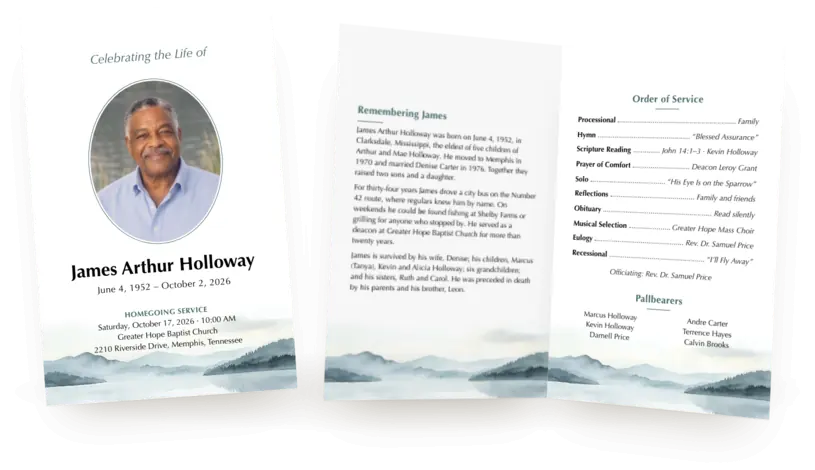
What a funeral program includes
Most programs share the same core content. The family decides how much to add beyond it.
- Always: the full name, the dates of birth and death, and the date, time and place of the service.
- Usually: a portrait, the order of service and a short life story.
- Often: a poem or scripture passage, the pallbearers, a thank-you message, and details of the burial and reception.
- Sometimes: a few more photos, a note about memorial gifts in lieu of flowers, and a QR code that links to the online obituary.
Leave out anything that doesn't help guests on the day. A program is not the place for the complete obituary or a full family tree.
How the four pages are laid out
The most common format in the US is a single sheet of Letter paper, 11 × 8.5 inches, printed on both sides and folded in half. The fold gives you four pages of 5.5 × 8.5 inches each.
| Page | What usually goes there |
|---|---|
| Front cover | Title, portrait, name, dates and service details |
| Inside left | Life story |
| Inside right | Order of service and pallbearers |
| Back cover | Poem or scripture, burial and reception details, thank-you message |
When you lay the sheet flat with the outside facing you, the back cover is on the left half and the front cover on the right. The two inside pages are on the reverse. This trips up many people who build a program in a word processor. Fold a blank sheet, label each page in pencil, then unfold it to check.
For a smaller service, a 5 × 7 inch memorial card is an alternative. It has a front and a back, with room for a portrait, the service details and a short poem or message.
Front cover: title, portrait, name and dates
The cover should tell guests at a glance whose service this is. Keep it to a title, one photo, the name, the dates and the service details.
In Loving Memory
Margaret Ann Collins
March 12, 1941 – October 9, 2026Funeral Service
Saturday, October 24, 2026 · 11:00 AM
St. Paul’s United Methodist Church
120 Main Street, Columbus, Ohio
Common titles: In Loving Memory, Celebrating the Life of, In Remembrance of, A Celebration of Life, Going Home, Forever in Our Hearts. A homegoing service often uses “Homegoing Celebration” or “Going Home.”
- Name: use the name people knew them by. A nickname can go in quotation marks, as in Robert “Bob” James Whitaker.
- Dates: write them out in full or use years only. Some families leave the birth date off, which is fine.
- Photo: choose a clear portrait where the face fills a good part of the frame. A phone photo works if it is sharp. Scans of old prints should be at least 900 pixels on the short side to print well on the cover.
Inside left: a short life story
The life story is a shorter, warmer version of the obituary. Aim for 150 to 300 words in three or four short paragraphs. If you cut a long obituary down to fit, keep the stories and drop the lists.
Margaret Ann Collins was born on March 12, 1941, in Zanesville, Ohio, the second of four children of Walter and Ruth Bennett. She married her high school sweetheart, Thomas Collins, in 1962, and together they raised three children in a house on Elm Street that was always open to neighbors.
For thirty-one years Margaret taught third grade at Lincoln Elementary, where she was known for her patience and her handwritten notes. She sang in the choir at St. Paul’s for more than forty years, and her peach pie was always the first to sell out at the church bake sale.
She is survived by her three children, seven grandchildren and two great-grandchildren.
A simple structure works for almost anyone: where and when they were born, the people and work that shaped their life, what they loved doing, and who survives them. Our obituary examples show more ways to start.
Tip: resist shrinking the text to fit more in. Body text below 10 point is hard to read for older guests, especially in a dim church.
Inside right: the order of service
The order of service lists each part of the ceremony in sequence, with the name of the reader, speaker or musician beside it. Ask the officiant or funeral director for the confirmed order before you write this page. Names and titles change late more often than anything else in the program.
Below the order of service there is usually room for the officiant's name and the pallbearers.
Officiating: Rev. Daniel Morris
Pallbearers
Michael Reed · Daniel Collins · Andrew Reed
Joshua Collins · Ryan Bennett · Thomas Reed
Four common orders of service follow in the next section. They are starting points, not rules. Every church and family does this a little differently.
Sample orders of service
Christian funeral
Prelude — Ellen Hayes, organ
Processional — Family and close friends
Opening Prayer — Rev. Daniel Morris
Hymn — “Amazing Grace”
Scripture Reading — Psalm 23 · Karen Collins
Obituary — Read silently
Musical Selection — St. Paul’s Choir
Eulogy — David Collins
Words of Comfort — Rev. Daniel Morris
Closing Prayer — Rev. Daniel Morris
Recessional — “How Great Thou Art”
Catholic funeral Mass
Gathering Hymn — “On Eagle’s Wings”
Greeting — Fr. Michael Bennett
First Reading — Wisdom 3:1–9 · Karen Collins
Responsorial Psalm — Psalm 23 · St. Paul’s Choir
Second Reading — Romans 14:7–9 · Susan Reed
Gospel — John 14:1–6
Homily — Fr. Michael Bennett
Prayers of the Faithful — David Collins
Liturgy of the Eucharist — Fr. Michael Bennett
Final Commendation — Fr. Michael Bennett
Recessional Hymn — “How Great Thou Art”
The parish usually chooses the readings with the family from an approved list, so check them with the priest.
Celebration of life
Welcome — Susan Reed
Opening Music — “What a Wonderful World”
Reading — “Remember” · Karen Collins
Remembrances — David Collins
Photo Tribute — Photos from Margaret’s life
Shared Memories — Family and friends
Closing Words — Susan Reed
Closing Song — “Somewhere Over the Rainbow”
Graveside service
Gathering — Family and friends
Opening Words — Rev. Daniel Morris
Scripture Reading — Psalm 23 · Karen Collins
Words of Remembrance — David Collins
Committal — Rev. Daniel Morris
Closing Prayer — Rev. Daniel Morris
Placing of Flowers — Family and friends
The funeral program maker includes all four as ready-made presets. Pick one, then change any line.
Back cover: poem, details and thanks
The back cover holds what guests need after the service, plus a closing reading. A typical back cover has three parts.
A poem or scripture passage. Choose one that is short enough to read in a minute. Some of the most used are:
- Poems: “Crossing the Bar” by Alfred Lord Tennyson, “Remember” by Christina Rossetti, “Death Is Nothing at All” by Henry Scott Holland, “Gone From My Sight” by Henry Van Dyke, and the traditional “An Irish Blessing.”
- Scripture: Psalm 23, Psalm 121, John 14:1–3 (“In my Father’s house”), Ecclesiastes 3:1–8 (“A time for everything”), Romans 8:38–39 and Isaiah 40:31.
- Hymns: “Amazing Grace,” “Abide with Me” and “It Is Well with My Soul.”
Credit the author or the passage under the text. If you choose a modern poem or song lyric, check whether it is still under copyright before printing it.
Burial and reception details. Only include what is open to all guests.
Interment
Maple Grove Cemetery
1450 Cemetery Road, Columbus, OhioReception
Following the service
Fellowship Hall, St. Paul’s United Methodist Church
A thank-you message, and memorial gifts if wanted.
The family is deeply grateful for your prayers, kindness and support. Thank you for being here today.
In lieu of flowers, memorial gifts may be made to the Lincoln Elementary School Library Fund.
For memorial gifts, give the organization's exact name and check how it accepts donations before you print.
A QR code, optionally. A QR code on the back can link to the online obituary, where guests can read the full life story and leave condolences. Print the web address beside it for guests who don't scan codes, and test the code on a printed copy.
If you choose a 5 × 7 memorial card
A memorial card suits a small service or a family that wants something to slip into a wallet or a book. It has two sides, so the content has to be shorter.
- Front: the title, portrait, name, dates and service details, as on the program cover.
- Back: a short message of about 50 words, a poem or a brief order of service, and up to four small photos.
Print cards on matte cardstock and use “flip on long edge” when printing on both sides.
Create it online instead of in a word processor
Setting up a folded program in Word or Google Docs means fighting with page order, margins and photos that move. The funeral program maker does the layout for you:
- Choose from light, calm designs made to print well at home. Every design comes as a folded program and a memorial card.
- Start from example text, a built-in library of poems and scripture, and the four orders of service above.
- Check the proof before you pay. It points out missing details, low-resolution photos and text that doesn't fit.
- Pay $19 once, with no account and no subscription. Download the PDF right away, and make free edits for 14 days.
Printing your funeral program
Order enough copies for every expected guest, plus about 20 percent extra. Families often want spares to send to relatives who couldn't attend.
| Format | At home | At a copy shop |
|---|---|---|
| Folded program | 32 lb matte paper | 80 lb text paper |
| Memorial card | 80 to 110 lb matte cover stock | 80 to 110 lb matte cover stock |
| Two-sided setting | Program: usually “flip on short edge.” Card: “flip on long edge.” Printers vary, so check with one copy. | |
- At home: most home printers can't print to the very edge of the page. Use a version of the file with a white border, so the margin is even all round.
- At a copy shop: Staples, FedEx Office and Office Depot can print, fold and trim programs, often on the same day. Bring a PDF rather than a Word file, so nothing shifts. If they trim to size, ask whether they need bleed and crop marks.
- Folding: fold one copy first to check the page order. Then fold the rest with a bone folder or the back of a spoon for a crisp edge.
The funeral program maker gives you three PDFs, with a white border for home printers, full bleed, and crop marks for a print shop. You can print as many copies as you need.
Checklist before you print the batch
- Spell every name the way the family wants it, including the deceased's middle name and nickname.
- Check the dates of birth and death, and the service day, date and time, against each other.
- Confirm the order of service, readers, musicians and pallbearers with the officiant.
- Check the addresses for the service, burial and reception.
- Ask one person who didn't write the program to read it from start to finish.
- Print and fold one copy on the paper you will use, and check the page order and margins.
- Scan the QR code from the printed copy.
Frequently asked questions
What size is a funeral program?
The standard folded program is one US Letter sheet, 11 × 8.5 inches, folded into four pages of 5.5 × 8.5 inches. Larger programs use Legal or Tabloid paper for six or eight pages. A memorial card is usually 5 × 7 inches.
How many funeral programs should I print?
Print one per expected guest, plus about 20 percent. Couples often share a program, but families usually want spares for relatives and keepsake boxes.
Who usually makes the funeral program?
Funeral homes often offer programs as part of their services. Many families make their own instead, to choose the wording and photos themselves or to save money. A family member or close friend who is good with details is a good choice for the job.
How long before the service should the program be ready?
Aim to have the final text approved two days before the service. That leaves time for a test print and for a copy shop order. If you print at home, allow an evening for printing and folding.
What is the difference between an obituary and a funeral program?
An obituary announces the death and tells the life story, usually online or in a newspaper. A funeral program is a printed guide to the service itself. The program often includes a short version of the obituary. Many families publish an online obituary and add a QR code to it on the back of the program.
Still writing the life story? Our obituary examples can help. Once the obituary is online, see how to share an obituary with family and friends.